
Is you're Android device quickly running out of space due to limited internal memory? And do you have a large collection of apps that refuse to move over to your SD card? Then, here's a simple and smooth guide which will help to move all your apps to the SD card and lemme mention.. system apps as well.
Apps that Shouldn’t be Moved to the SD Card:
Widgets – no matter how menial in usefulness or design.
System tools – many might not operate as intended without being on the phone’s storage.
Important apps – you don’t want to risk an important app becoming inaccessible when you need it.
Note: Even after applying the below tweak, some apps may still refuse to be moved over. In all likeliness, Facebook will be one of these. In this case, rooting your mobile device will be the only way to truly move or remove such an app.
Steps:
Make sure you have SDK installed in your PC. Also, the drivers of your phone and the adb drivers.
Then go to USB Settings and check debugging.
Now open cmd in the platform tools folder.
Connect your mobile to the PC with a USB cable.
Type adb devices and see if your device is connected.
Now, type the following code
adb shell pm getInstallLocation (For Android < v4.0)
adb shell pm get-install-location (Android > v4.0)
Youll probably get 0 as the output i.e. the default location is phone.
Now type these codes to change the install location.
adb shell pm setInstallLocation 2 (Android <4.0)
adb shell pm set-install-location 2 (Android 4.x)
Once the last command is set, you can run the ‘get-install-location’ command again to verify that it took effect. If so, then you can unplug your phone and get on with moving some apps.
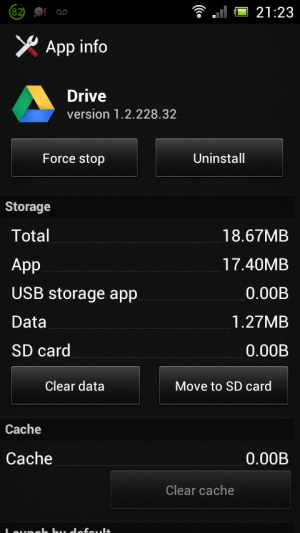
Go to Settings>Applications>All Apps>then your desired app.
There the app should show "Move to SD card" option.
Some may not be movable, but almost all will be. Carry on with your cleaned internal memory.

Tip - Try 'Link2Sd' or 'App2SD' for better results.
Happy Modding!
Team HotMOD!;)
Apps that Shouldn’t be Moved to the SD Card:
Widgets – no matter how menial in usefulness or design.
System tools – many might not operate as intended without being on the phone’s storage.
Important apps – you don’t want to risk an important app becoming inaccessible when you need it.
Note: Even after applying the below tweak, some apps may still refuse to be moved over. In all likeliness, Facebook will be one of these. In this case, rooting your mobile device will be the only way to truly move or remove such an app.
Steps:
Make sure you have SDK installed in your PC. Also, the drivers of your phone and the adb drivers.
Then go to USB Settings and check debugging.
Now open cmd in the platform tools folder.
Connect your mobile to the PC with a USB cable.
Type adb devices and see if your device is connected.
Now, type the following code
adb shell pm getInstallLocation (For Android < v4.0)
adb shell pm get-install-location (Android > v4.0)
Youll probably get 0 as the output i.e. the default location is phone.
Now type these codes to change the install location.
adb shell pm setInstallLocation 2 (Android <4.0)
adb shell pm set-install-location 2 (Android 4.x)
Once the last command is set, you can run the ‘get-install-location’ command again to verify that it took effect. If so, then you can unplug your phone and get on with moving some apps.
Go to Settings>Applications>All Apps>then your desired app.
There the app should show "Move to SD card" option.
Some may not be movable, but almost all will be. Carry on with your cleaned internal memory.
Tip - Try 'Link2Sd' or 'App2SD' for better results.
Happy Modding!
Team HotMOD!;)

No comments:
Post a Comment